Event Log
Event Log provides administrators with a centralized view of activities and actions performed within the system. It is designed to support auditing, monitoring, troubleshooting, and security investigations by maintaining a detailed record of system events.
Permissions
Access to the Event Log is restricted to users who have the required permissions to view:
- Administrative Tools
- Event Log
Users without these permissions will not be able to access the Event Log section.
Accessing the Event Log
To access the Event Log:
- Navigate to Settings → Control Panel → Administrative Tools → Event Log.
- The Event Log page displays a list of recorded events from across the system.
The Event Log contains a chronological list of events generated by user actions and system operations. Each entry provides information about the event, allowing administrators to review activity and investigate issues when necessary. The log serves as a historical record of actions performed within the platform and can be used to track user activity, system changes, and operational events.
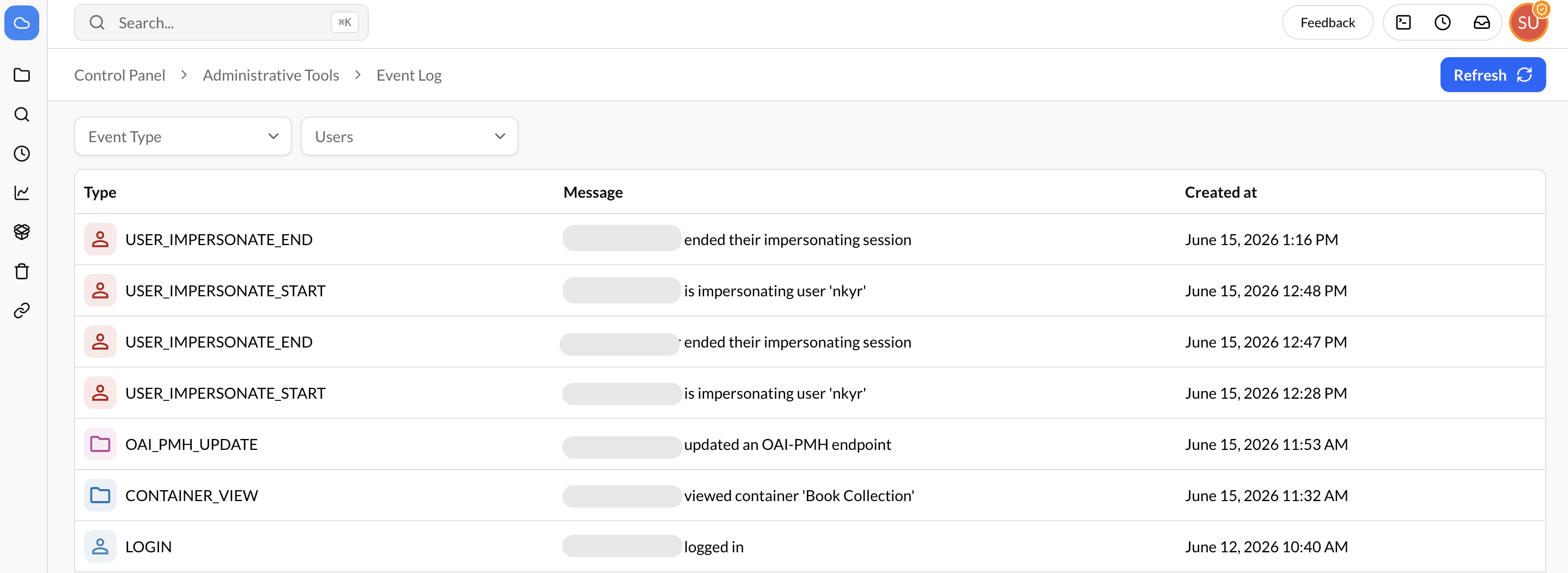
Filtering Events
To help locate specific records, the Event Log provides filtering capabilities.
Filter by Event Type
Administrators can filter the displayed records by Event Type to view only events related to a specific action or category.
This is useful when investigating particular activities or monitoring specific system operations.
Filter by User
Administrators can filter the logs by User to view events associated with a specific user account.
This allows administrators to review user activity, verify actions performed by a user, or investigate reported issues.